The problem with meeting notes is rarely the notes. It's that nothing happens after them. The doc gets created, three people skim it, and the action items rot.
An agent fixes the after. The summary lands the moment the meeting ends, action items become real tasks, owners get pinged, and the next time those people meet, the agent already knows what was unresolved.
What a useful meeting summary actually contains
Skip the verbatim transcript. Nobody re-reads transcripts.
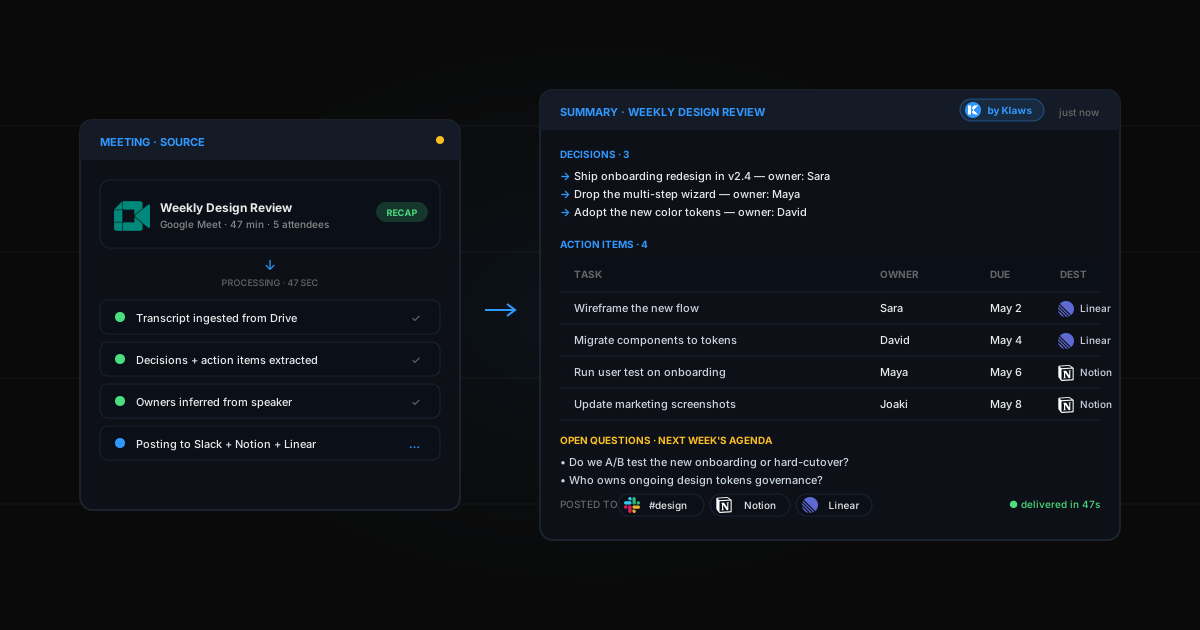
A useful summary has four parts:
- Decisions — what was agreed, in one line each, with who's accountable
- Action items — discrete tasks with owners and due dates
- Open questions — things raised but not resolved (these go on the next agenda)
- Context for next time — one paragraph the next meeting can open with so you don't relitigate
That's it. If your summary is more than half a page, it's a transcript wearing a costume.
Three ways to feed your agent a meeting
1. Google Meet recap
Turn on Take notes for me in your Google Meet settings. After the call, the recap lands in Google Drive. Your agent watches that folder and processes anything new automatically.
2. Zoom transcript
Enable cloud recording with transcript. After the call, Zoom emails you the transcript. Forward to your agent's email address (in Gmail integration settings) or save it to a watched Drive folder.
3. Paste-in
For ad-hoc calls, paste the transcript or your raw notes into the Klaws chat: "summarize this call, assign action items to the speakers, post the result in #project-x." Same output, manual trigger.
The old way (notes that go nowhere)
- Type notes during the meeting (you miss half of what's said)
- Clean them up after (you procrastinate, do it half-assed two days later)
- Send the summary email (some people read it)
- Hope action items get done (they often don't)
- Next meeting starts cold (someone says "wait, what did we decide last time?")
Time spent: 20-30 min per meeting on note cleanup. Outcome: mediocre.
The Klaws way
- Recording or transcript becomes available
- Agent processes it within 60 seconds
- Summary lands in your chosen channel
- Action items become tasks in Notion / Linear with owners and due dates
- The agent puts an item on the next recurring meeting's calendar invite recapping unresolved questions
Time spent: 30 seconds to skim. Outcome: action items get done because they're owned.
Step-by-step setup
Step 1: Connect the source
Pick whichever applies and connect it from Integrations:
- Google Calendar (for invite-aware summaries)
- Google Drive (Meet recaps land here)
- Gmail (Zoom transcript emails)
Step 2: Connect the destination
Where the summaries land:
- Notion — for a searchable archive per project
- Slack — for team visibility, posted in the right channel
- Linear — if action items should become tickets immediately
Step 3: Write the brief
When a Google Meet recap appears in Drive folder "Meetings", do this:
- Identify decisions, action items, open questions, and a one-paragraph context recap
- For each action item, identify the owner from the speaker name and a reasonable due date (default 1 week)
- Post the summary in the Slack channel matching the meeting title (e.g., "weekly-design" → #design)
- Create each action item as a Notion task assigned to the owner
- If the meeting is a recurring series, add the open questions to the next instance's calendar description as the agenda
Hit save. Your agent waits.
Step 4: Verify the first one
Run a real meeting. Within a minute of the recap landing, you should see the summary post and the tasks created. If something's off — wrong channel, missed an action item, due date too aggressive — tell the agent. It updates the rule.
Real examples
Weekly 1:1
Summary into Notion under "1:1 / [report name]". Action items become Linear tasks tagged
1on1. Open questions roll into next week's invite. The agent opens the next 1:1 with: "Last week we left these unresolved..."
No one walks into a 1:1 cold again.
Sales discovery call
Summary posted in #sales-pipeline tagged with the prospect's name. Action items assigned to the rep with due dates. CRM gets the notes appended to the deal. If the prospect mentioned a competitor, flag it in #competitive.
The rep stops writing the same recap email after every call.
Design review
Summary in #design with screenshots embedded if the meeting mentioned them. Decisions go to a "Decisions Log" Notion page. Open questions go to the next standup agenda. If anyone said "we should test this with users," create a research task automatically.
Decisions stop getting relitigated three weeks later.
All-hands
Summary posted in #all-hands within 5 minutes of meeting end. Anyone who couldn't attend gets a DM with the link. Action items by team go to each team's channel. Open Q&A items get flagged for the next session.
The 100 people who didn't attend still know what happened.
Common mistakes
- Asking for a transcript, not a summary — transcripts are useless. Force the agent to interpret.
- No owner on action items — every action item needs a name. "We" is not a name. The agent should infer or ask.
- No due date — without a date, action items decay. Default to 1 week, override per item.
- Sending the summary to a channel nobody watches — match the destination to the meeting. Wrong channel means it's invisible.
The deeper unlock
Once your agent has been summarizing meetings for a month, it has context. It knows what the team decided in February, what the open questions were in March, what got blocked in April. You can ask: "why did we pick Postgres over DynamoDB?" and it can answer with the decision, who pushed for it, and the trade-offs raised at the time.
That's the real product. Not summary generation. Institutional memory that doesn't depend on someone remembering to write it down.
Want this kind of long-term memory for everything else too? See how to deploy your first AI agent.