The first 30 minutes of your workday are usually spent figuring out what your workday should be. Email triage, calendar check, "what did I miss in Slack last night," skim the news, oh-and-also that thing from yesterday I forgot.
A daily briefing flips that. You wake up to one message that already did the triage.
What goes in a good briefing
The mistake most people make is dumping everything in. A briefing isn't a dashboard. It's a decision aid. Three to five sections, one screen tall, optimized for "what do I do first."
A solid template:
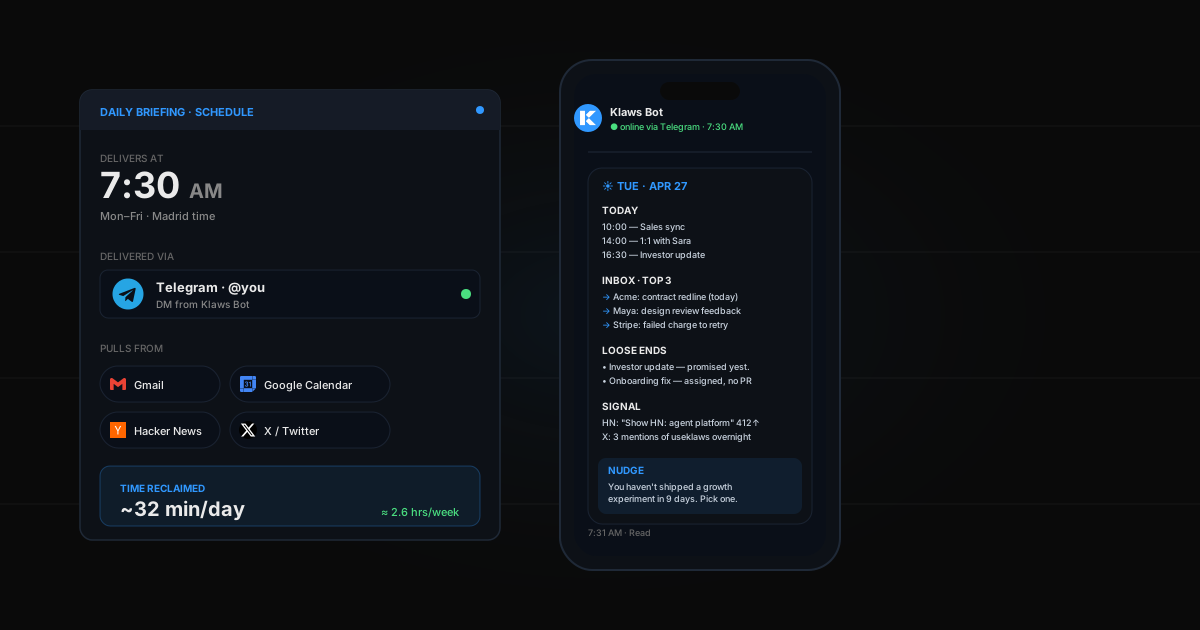
- Today at a glance — meetings, deadlines, anything that has to happen
- Inbox priorities — top 3-5 emails that need a reply (not all unread, just the ones that move things forward)
- Yesterday's loose ends — anything you said you'd follow up on but didn't
- Signal you'd otherwise miss — competitor moves, customer mentions, a price alert, a GitHub issue spike
- One nudge — the agent reminds you of one thing you've been avoiding
That's it. Five sections. Every morning, same shape, different content.
Where to deliver it
Pick the surface you actually open first thing:
- Telegram if your phone is your morning tool
- Gmail if you live in inbox-zero culture
- Slack as a DM to yourself if work is your first ping
- Discord if your team brief goes to a shared channel
Don't try to deliver to all four. One channel. Reliable.
The old way (death by tabs)
- Open Gmail, scan 80 unread, decide which 5 matter
- Open Calendar, count today's meetings
- Open Slack, scan 6 channels for anything from overnight
- Open Twitter / GitHub / your news source
- Open Notion to find that thing from yesterday
- Try to remember the morning routine you wanted to start
Time: 25-40 min. Result: by the time you sit down to work, you're already drained.
The Klaws way
One scheduled task. Three connected integrations. One delivered message.
Time to set up: 5 minutes. Daily time saved: ~30 minutes.
Step-by-step setup
Step 1: Connect what your briefing reads from
For most people, that's:
- Gmail — for inbox priority
- Google Calendar — for today's meetings
- One signal source: Slack, Reddit, Hacker News, or X/Twitter
Connect these in the Integrations tab.
Step 2: Pick the delivery channel
Connect Telegram (most popular), or use Gmail to email yourself, or Slack to DM yourself.
Step 3: Write the brief
In your Klaws chat, paste this and edit to taste:
Every weekday at 7:30am Madrid time, send me a daily briefing on Telegram with these sections:
- Today — every calendar event with time, attendees, and a one-line context note
- Inbox — top 3 emails that need a reply today, with the ask in one line each
- Loose ends — anything from yesterday I committed to but didn't ship
- Signal — top 3 items from Hacker News and any GitHub issue with >50 reactions on repos I follow
- Nudge — one task I've been avoiding, picked from my Notion to-do list
Keep it under 400 words. Use bullet points. No fluff.
Your agent confirms the schedule and is live tomorrow at 7:30am.
Step 4: Tune for a week, then leave it
The first 3-4 mornings, reply with corrections: "don't include marketing emails", "skip meetings under 15 min", "the nudges are too soft, be sharper." Your agent updates the prompt itself.
After a week it's tuned. You stop touching it.
Real examples
Founder briefing
7:00am: Today's 3 meetings + agendas pulled from invites. Top 3 inbox items (skip newsletters, vendor pitches). Yesterday I promised the investor an update — flag it. Pull any mention of "useklaws" from Twitter and Reddit overnight. End with one growth experiment I haven't shipped this week.
Sales rep briefing
6:30am: Calls today with prospect notes from CRM. Inbox: any reply from a deal in pipeline (skip prospecting). Yesterday's no-shows — auto-reschedule template ready. Pull any LinkedIn post from prospects in active deals. Nudge: the deal closest to close that I haven't touched in 5 days.
Engineering manager briefing
8:00am: 1:1s today with prep notes from Notion. PRs awaiting my review. Yesterday's ship — one-line summary. Overnight production alerts. Nudge: any direct report I haven't 1:1'd in 14+ days.
Common mistakes
- Too much in the briefing — if it's longer than your screen, you skim and lose the signal
- Too early or too late — set it for 5 minutes before you typically open your phone, not when you're still asleep
- No tuning week — out-of-the-box briefings are 70% right; the last 30% comes from a few corrections
- Multiple channels — pick one. Two channels means you read neither.
What this is really about
A daily briefing isn't a productivity hack. It's a replacement for the thing your brain does badly first thing in the morning — triage. You're outsourcing the cognitively expensive part of starting your day. The agent does it overnight. You wake up and decide. That's the win.
Want to layer more on top? See 5 high-impact tasks to delegate to an AI agent.